
Packstation
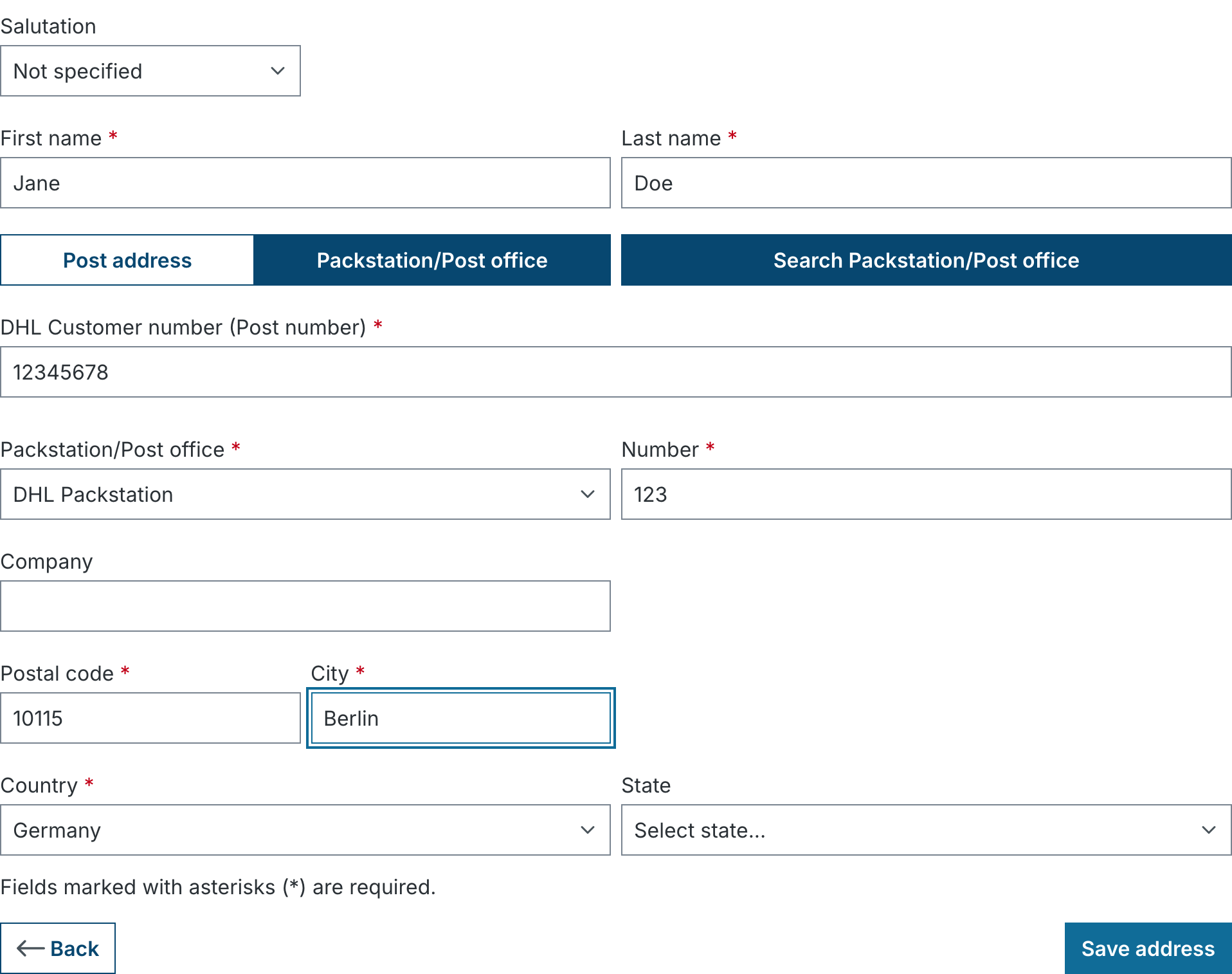
The plugin lets customers use a DHL Packstation or post office as their shipping address. They can type in the details themselves or pick a location from a map search. At checkout the shop checks whether the cart can actually be delivered to the chosen pickup location.
The problem
Without the plugin, customers type "Packstation 123" into the street field and put the post number somewhere else, often wrong or missing altogether. DHL cannot deliver the parcel, the shop gets returns, and the ERP system has no idea the address is a pickup location.
The solution
In the address form the customer chooses between Post address and Packstation/Post office. For a Packstation only the fields DHL needs are shown: type, number of the pickup location and the DHL customer number (post number). The plugin turns this into a postal-compliant address stored in Shopware's standard fields:
| Address field | Content |
|---|---|
| Street | Packstation 123 or Post office 456 |
| Additional address line 1 (configurable) | Post number, e.g. 12345678 |
| Zip code, city, country | as entered; the country is set to Germany automatically |
ERP, shipping labels and invoices keep working without changes because no new address fields are needed.
Features
- Address form: switch between post address and Packstation in registration, customer account and checkout, for shipping addresses only. A Packstation can never become a billing address.
- Map search: search Packstations and post offices by zip code/city, pick one on an OpenStreetMap map and apply it with one click. Results come live from the DHL Location Finder API.
- Post number check: format validation of the post number; for post offices optionally an e-mail address instead of the post number.
- Location check (optional): does the entered Packstation/post office number really exist at that zip code? Verified against the DHL API.
- Cart validation: exclude individual products from Packstation delivery. In addition the plugin checks dimensions and weight against the DHL limits for Packstations and post offices.
- Rule builder: condition "Shipping to Packstation", e.g. to restrict shipping or payment methods.
- Consent: the map search only starts after consent in the cookie banner. Supported: Shopware's cookie banner, consentmanager.net, Cookiebot and Usercentrics.
Terms
| Term | Meaning |
|---|---|
| Packstation | DHL parcel locker. Receiving parcels requires a post number. |
| Post office | Branch, parcel shop or Postbank branch that accepts DHL parcels. Receiving works with a post number or, if enabled, with an e-mail address. |
| Post number | DHL customer number (6 to 10 digits) the customer gets from DHL when registering for Packstation delivery. |
| Pickup location | Collective term for Packstation and post office. |
| Address type | The choice in the form: Post address or Packstation/Post office. |
Requirements
- Shopware 6.5.8, 6.6 or 6.7
- Germany as an active country in the sales channel (DHL Packstations only exist in Germany)
- Outbound HTTPS access from the server to
api.dhl.comfor search and location check